A spreadsheet can store names. It cannot tell a teammate who was called, what was promised, and what still needs to happen. For an advisory firm, a CRM has to hold households, conversation history, and the next follow-up in one place the team can open.
There isn't one best CRM for every financial advisor.
The right choice depends on who will use it, what it has to connect to, whether marketing and client records belong in the same system, and who will keep the data clean. Vendor prices and feature lists change. This guide is about how to compare, not a live catalog.
Get a current demo and the full price in writing from anyone you might pay.
Key takeaways
- Hire the software for the jobs you need: household records, conversation history, tasks, files, and any marketing work you actually run.
- An advisor CRM and a marketing CRM often do different jobs. Confirm which one is the main client record before you buy a second tool.
- Wealthbox, Redtail, Salesforce Financial Services Cloud, HubSpot, Practifi, and Creatio are names to evaluate. They are not the same product. Ask each the same questions and compare written answers.
- The monthly seat price is not the year-one cost. Add implementation, data cleanup, training, archiving, and staff time.
- Have your compliance reviewer check how email, text, and files are stored before you go live. This article is not legal or compliance advice.
- Keep the old system available until the new one works on real households.
What a CRM has to hold for an advisory firm
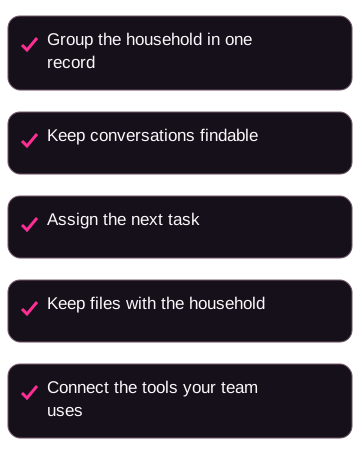
A useful CRM is the place your team opens to answer three questions: who is in this household, what have we already said, and what happens next.
Households, not only individuals. A relationship can include two spouses, a trust, adult children, and a business. If every person sits as an unlinked contact, your team will keep rebuilding that picture from memory.
A history of conversations. Notes, emails, meetings, and texts (if you text) need a home the next person can find. If that history lives in one advisor's inbox, it leaves when they do.
Tasks and handoffs. New-client paperwork, review prep, and follow-up with someone who is not ready yet are processes. If the next step is not in the system, it lives in someone's head.
Files next to the household. Signed documents and the last review notes belong with the record. A folder on one laptop is not a team system.
Connections to the rest of your tools. Ask what the CRM can receive from your custodian, calendar, e-signature tool, planning software, and marketing tools. A logo on a marketplace page does not prove the feed is turned on. It also does not prove it is included in your quote.
If the book still lives in Outlook plus a spreadsheet, the cost is not only clutter. You get duplicate names, missed follow-up, and a new hire who cannot see what already happened.
For how this sits next to finding new conversations, see lead generation for financial advisors and wealth-management marketing strategies.
Should you use an advisor CRM, a marketing CRM, or both?
These products get lumped together because they all store people. The jobs are different.
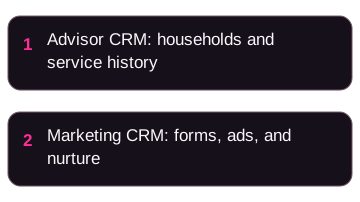
An advisor CRM is usually hired to hold the client record: households, service work, and the history of contact with people you already work with.
A marketing CRM is usually hired for the front of the funnel: forms, landing pages, ads reporting, email sequences, and a pipeline of people who are not clients yet.
Some firms run one system for both. Some run two, then copy or sync a person into the advisor CRM when a meeting is booked. Neither pattern is automatically better.
The failure mode is using a marketing tool as the only household record without checking that it can do that work. The other failure mode is buying an advisor CRM and expecting it to replace ad reporting it was never shown to do.
In a demo with your kind of household, ask:
- Can this be the main client record, or is it mainly for prospects?
- What happens when the same person is a lead in marketing and a client in service?
- Who enters data, and who is allowed to see which households?
- If we run ads or publish articles, where do those inquiries land, and who follows up?
If you run paid ads or content, Facebook ads for financial advisors and the lead-generation guide cover the marketing side. They do not pick a CRM for you.
How to compare the names you'll keep hearing
This page's comparison set is Wealthbox, Redtail, Salesforce Financial Services Cloud, HubSpot, Practifi, and Creatio, plus a shorter list of other names. That is a shortlist to question, not a ranking. We have not run a head-to-head test. Use each company's current site, a demo, and a written proposal to check the features and price your firm would receive.
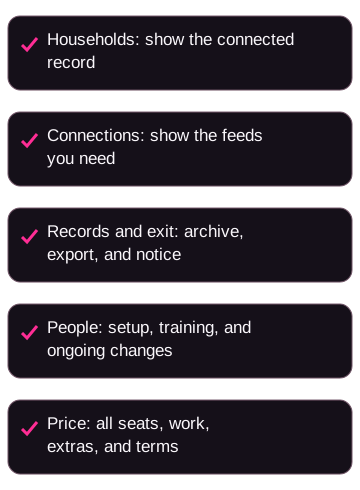
Use the same five questions in every demo. Record the answers in a worksheet and get the scope in writing.
- Households: who is this software built for, and can the vendor show two spouses, a trust, and a child in one connected record?
- Connections: which custodian, planning, calendar, and marketing feeds are included, extra, or custom? Ask what happens to a bad email address or phone number.
- Records and exit: where do sent emails and texts live, who can delete them, and what can you export if you leave? Include the archive and notice period.
- People: who implements the system, trains your team, and changes a workflow after month three? Ask whether that work costs extra.
- Price: get seats, modules, implementation, training, archiving, and the minimum term on one written quote.
Wealthbox
Ask Wealthbox to show the household view, email sync with the mail system you actually use, and whether you can run it without a long consulting project. Ask for a real mobile session, who can build a workflow, and which custodian feeds are live for you. Ask whether email or text archiving is included or a separate product. Confirm trial terms and the full quote. Start from the Wealthbox site.
Redtail
Ask Redtail to show the workflows and custodian connections you would actually use. Ask about coverage for each custodian you use, document storage, SMS, bulk email, and whether those are included or billed extra. Ask how long new users typically need before they stop hunting for screens. Confirm current product family, packaging, and quote on a current Redtail page. Start from the Redtail site.
Salesforce Financial Services Cloud
Ask whether you need a dedicated admin, what a partner implementation would cost, how you will build reports, and how your custodians connect: a native feed, a third-party aggregator, or a project. Ask what you would customize versus use as it ships. Ask for a quote that includes licenses, extra clouds, storage, and the implementation partner. Start from Salesforce Financial Services Cloud.
HubSpot
Ask whether it can hold household client records the way your service team works, or whether it should stay the prospecting layer next to an advisor CRM. If you need ads, landing pages, sequences, or scoring, ask them to show that work in the same demo, and whether it belongs in the same system as the household record. Ask for a quote that includes every Hub you would turn on, contact-tier limits, and any archive add-on. Start from HubSpot's CRM products.
Practifi
Ask Practifi to show household assignment and the workflows your advisors would run, on a current demo. Confirm the current architecture and packaging on Practifi's site. Do not take an old blog table as the spec. Ask about splits, custodian and billing work, implementation, and whether you still need specialist admin skill after go-live. Start from the Practifi site.
Creatio
Ask whether you would use Creatio as the household client record or as a workflow layer you configure, including processes that are not a classic client book. Ask whether custodian feeds, planning-tool sync, and texting are native, a marketplace install, or a custom build. Ask who will configure the system after go-live, what a small team will actually use, and for a quote that includes every product you would need. Start from the Creatio site.
Other names that show up
You may also hear names such as AdvisorEngine CRM, Zoho CRM, Pipedrive, and Ugru CRM. Same rule: get a current demo. A generic sales CRM can be a poor household record even if the monthly price looks low. A smaller advisor CRM can be a poor fit if the connections you need are missing.
If two vendors look the same on a checklist, have each walk one real household and one real prospect through the product. The difference usually shows up in the demo.
What year one can actually cost (example)
Don't compare two CRMs on the monthly price per user alone.
One quote may include email tools, workflows, and support. Another may bill those as add-ons. Implementation, data cleanup, training, archiving, and the hours your team spends in the first months are part of the same decision. Ask for the full price in writing, including the minimum term.
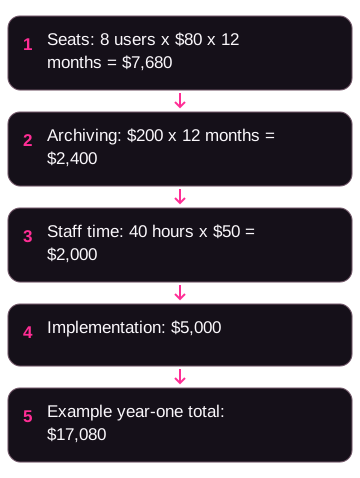
Here is a made-up example so you can see the arithmetic. These are invented figures, not a quote from any vendor on this page, and not a typical result.
Assumptions for this example:
- 8 users
- $80 per user per month for the core CRM, billed for 12 months
- $5,000 one-time implementation and data import
- $200 per month for a separate archiving tool
- 40 hours of staff time at $50 per hour to clean data and learn the system
Core subscription: 8 x $80 x 12 = $7,680
Archiving: $200 x 12 = $2,400
Staff time: 40 x $50 = $2,000
Implementation: $5,000
Year-one total in this example: $7,680 + $2,400 + $2,000 + $5,000 = $17,080
The $80 monthly sticker would have looked like $7,680 for the year. In the example, those extra costs push the year-one total to $17,080, which is more than double the $7,680 sticker. Your numbers will differ. If you leave staff time or archiving out of one vendor's column, you are not comparing the same thing.
Then keep going. If only half the seats get used, you paid for empty logins. If follow-up still happens in personal inboxes, the CRM is not doing the job you bought it for.
For broader marketing spend context, see financial advisor marketing cost. That page is about marketing cost, not a CRM price list.
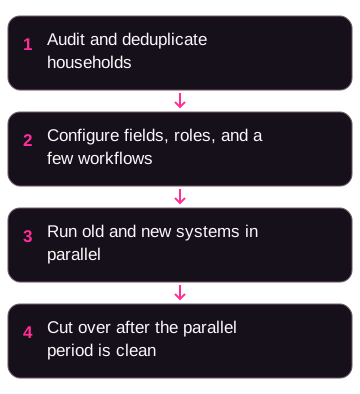
A rollout sequence that keeps the old system until the new one works
Buying licenses is the easy step. Moving households, notes, and habits is the hard one.
You need a named owner, cleaner data than you think you have, and a stretch of time when both systems run.
Data audit. Export contacts, households, notes, and files. Merge duplicates. Agree how a household is grouped before anything is imported. Flag missing people, missing files, and notes that only exist in email.
Configuration. Set fields, pipelines, user roles, and the first few workflows you will actually run: new-client onboarding, review prep, prospect follow-up. Connect email, calendar, and e-signature in a test environment. Don't build dozens of workflows on day one.
Parallel run. Load the cleaned data. Use the new CRM for real work while the old system stays available. Check that connections, archives, and permissions do what you were shown. Put training on the calendar. A PDF is not training.
Cutover. Switch the main record to the new CRM only after the parallel period looks clean. Keep a read-only copy of the old system until your compliance reviewer is satisfied you can still produce older records.
Name one person who owns the rollout. If you cannot name that person, you are not ready to migrate.
How long this takes depends on user count, how messy the data is, and whether you need an outside partner. Ask each vendor for a plan that matches your firm, then add time for the audit and the parallel run. Don't treat a marketing page that promises a one-week go-live as a promise.
Records, messages, and your compliance reviewer
Advisory firms keep records of how they communicate with clients and with the public. What you must keep, for how long, and in what form is a question for your firm and your compliance reviewer. A blog post cannot certify that a product meets your obligations.
Bring your CCO or compliance consultant into the evaluation. Ask them to look at:
- How email, text, calls, and attachments are captured, and whether anyone can silently delete them
- Whether you need a separate archive vendor
- Who is allowed to see which households
- How you would produce a record if you were asked for it
- How marketing pages, ads, and testimonials would be stored if you run those channels
Ask your firm's reviewer to identify the current recordkeeping rules for your registration and written procedures. Have them check the actual storage, retention, and export process before you rely on it.
Do not treat a vendor's compliance language as your approval. Do not treat this guide as legal advice. Set retention and permissions before you go live, not months later.
If you also market online, SEO for financial advisors and email marketing for financial advisors cover process on those channels. Still have compliance review the actual messages and the archive.
If you also run ads and content, connect the two jobs
A CRM does not create clients by sitting on a server. If you run ads, search, webinars, or email, you still need a place for the inquiry to land and a person who will follow up.
A pattern to evaluate is:
- An advisor CRM for households and client service
- A marketing tool for forms, ads reporting, and nurture
- A booking tool
- An archive on the channels you actually send from
- A defined handoff when someone books a conversation
That is a pattern to test, not a stack we have proven for your firm. Tools, costs, and results vary. Ads, SEO, a CRM, or a budget do not guarantee meetings or clients.
Nail down:
- Which system is the source of truth at each stage
- How a person's source is recorded, so you are not guessing later
- Who contacts a new inquiry, and what happens when they do not answer
- Whether qualified people move into the advisor CRM automatically or by hand
If nobody has time to follow up, buying more software will not create more hours. Name the person first.
OJay Media is a marketing agency for wealth advisors. We don't sell CRM licenses. We do have a commercial interest if you later want help with the pages, ads, qualification questions, and follow-up that feed whatever CRM you pick, under your firm's name. That work is optional and separate from choosing Wealthbox, Redtail, or anyone else.
For channel context, see lead generation for financial advisors and LinkedIn for financial advisors.
Mistakes that make a CRM switch harder than it needs to be
Picking on a feature count. A longer checklist often favors the most customizable platform. If your team will not use that depth, you paid for complexity.
Skipping the data audit. Dirty duplicates in a new CRM are still dirty duplicates.
No owner. A migration without a named person stalls.
Going live with no overlap. Run the old and new systems together until you trust the new one.
Undertraining. If advisors never get hands-on time, they go back to spreadsheets.
Leaving archive and permissions for later. That is a compliance problem, not a nice-to-have.
Building every workflow on day one. Start with the few processes people already miss. Add what they ask for after they are using the system.
Using a marketing CRM as the client household record without checking that it can do that job. Confirm it in the demo with a real household.
A few common questions
What is the best CRM for financial advisors?
There isn't a single best one. Match the product to the jobs, the number of people who will log in, your custodians, and whether marketing and client records belong in one system. The six names in this article are a comparison set to take to demos. We cannot honestly tell you which one will work better for your firm without your quote, your data, and your team's actual use.
Can a marketing CRM replace a specialized advisor CRM?
Only if a demo with your households, custodians, and archive needs shows it can do the client-record job. Many firms keep a marketing CRM for prospects and a specialized advisor CRM for the book, then connect the two when a meeting is booked. Ask both vendors what they will not do.
How should I compare CRM prices?
Ask for a written quote that includes every module, user, implementation package, archive tool, and contract term. Add your team's time. Use the made-up year-one example above as a worksheet, not as a benchmark. Don't build a budget from an old blog table.
How long should a CRM switch take?
Ask each vendor for a plan that matches your user count, data quality, and connections. Firms with clean data move faster than firms with years of duplicates. Add time for a parallel run. The shortest timeline on a marketing page is not a promise.
What should I ask every vendor in a demo?
Walk one prospect and one client household from first capture to a stored record. Ask what was checked, who else can see it, what you receive, how follow-up is logged, the full cost, and what happens when the record is a duplicate or the details are wrong. Then ask who implements it and who you call when a feed breaks.
If you are choosing this quarter, shortlist two vendors, run trials on realistic data, get the full price in writing, and sit with your compliance reviewer before you sign. That is the useful next step. A second migration costs more than a slower first decision.