There's no single best email platform for every advisory firm. The useful choice depends on the job you need the software to do: newsletters, nurture sequences, advisor-specific content, lead routing, a CRM connection, or an approval workflow your reviewer can actually use.
If you mainly send a newsletter, a general-purpose tool can be enough. If you also need industry content, a review trail, or leads passed into your CRM, you have to see those jobs in a demo. A feature list is not the same thing.
Here's how I'd compare options before you move your list.
Key takeaways
- Choose by the workflow your team will actually run, not by a "best for advisors" label.
- A general-purpose platform can work when your firm already owns content, CRM handoff, approvals, and archives.
- Advisor-focused vendors may pitch extra content and review tools. Get a current demo and written quote. Do not assume the category does the work.
- Compare the full cost: subscription, setup, users, integrations, content, review time, and what it takes to leave.
- Software does not decide whether a message is allowed. Your compliance reviewer does.
- After you pick a tool, assign owners for welcome, nurture, re-engagement, pre-meeting, and post-meeting messages. Adapt those to how your firm actually works.
Start with the job, not the vendor name
Write down what the software has to do in your firm. A demo is useful when you can point to a real job. Start with these five questions.
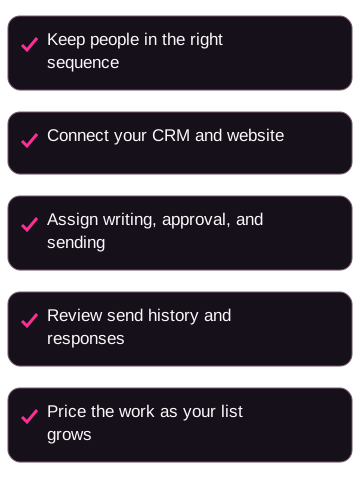
Can you keep the right people in the right sequence? Keep prospects, clients, referral partners, and inactive contacts separate. Ask what can start or stop a sequence: a form, a booked meeting, or a stretch with no replies. Check that your team can maintain those groups.
Does it connect to the tools you already use? Ask how contact details move between the email platform, your CRM, and your website. Have the vendor show that handoff with an example record.
Who writes, approves, and sends? Decide whether your team writes the material or uses vendor-created content. Ask who owns it and how you control drafting, editing, approval, and sending.
Can you see what went out and what happened next? Ask how you retrieve a prior message and its approval. Look beyond opens to delivery, clicks, unsubscribes, and actual conversations. One metric should not decide the purchase.
What happens to the bill as you grow? Ask what changes with contact volume, send frequency, users, setup, integrations, and annual billing.
Weight these questions based on how your firm works and who approves the messages.
Email service provider
An email service provider, or ESP, is software for managing subscriber lists and sending campaigns. Its tools handle delivery, unsubscribes, and reporting.
Marketing automation
Marketing automation uses rules to send a message or create a follow-up task when a contact does something or meets a condition.
When a general-purpose platform can be enough
A general-purpose platform is worth testing when the main job is a reliable newsletter, simple audience groups, and straightforward automation. It can also fit when your firm already has a content process, a CRM workflow, a review process, and a way to keep records.
Mailchimp and Constant Contact are the two general-purpose platforms on this shortlist. Start with each vendor's own pages, then confirm the plan that would apply to you in writing:
- Mailchimp email features and Mailchimp marketing pricing
- Constant Contact email marketing and Constant Contact pricing
Ask each of them:
- Which plan matches your contact count and sending volume?
- What happens if you go over those limits?
- Which integrations you actually need are included?
- How you export contacts, consent records, and message history if you leave?
The practical question is not whether the tool has a long feature list. Ask whether your team can run approvals, archives, and CRM updates around it. If the answer depends on spreadsheet exports or undocumented sign-off, write that down before you compare subscription prices.
For how email sits beside the rest of your marketing, see email marketing for financial advisors.
How advisor-focused platforms differ
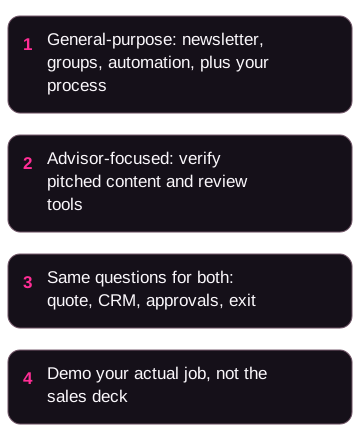
Advisor-focused vendors may pitch extra content and review tools. Get a current demo and written quote. Do not assume the category does the work.
Ask each one to show any mix of advisor-oriented content, automation, lead capture, CRM connections, support, and review workflows that you actually need. That pitch is a starting point for a demo, not proof that your team will do less work. Treat any claim that the platform will shorten your process as something to test with your own content, your own CRM, and your own reviewer.
This page's comparison set includes four advisor-focused vendors:
Levitate. Ask them to show advisor-oriented email and social content, how drafts get reviewed, and what support is included in the quote. Start with Levitate for financial advisors, then get the price in writing.
FMG Suite. Ask them to walk through the marketing channels you actually use. Get a quote that states the plan, setup, included users, contract term, and integrations. Start with FMG Suite marketing and FMG Suite pricing.
AdvisorStream. Ask them to show personalized email, newsletters, nurture, landing pages, CRM connection, archiving, approval, and reporting if those are jobs you need. Confirm which plan you'd be on and whether billing is monthly or annual. Start with AdvisorStream and AdvisorStream pricing.
Snappy Kraken. Ask them to show advisor-specific content, automation, lead capture, integrations, review workflows, and any done-for-you services in the suggested plan. Confirm setup, annual-term conditions, and plan limits. Start with Snappy Kraken and Snappy Kraken pricing.
Don't infer fit from the category name. Compare how much content and process each platform still asks your firm to supply.
I haven't run a head-to-head test of these products, so I can't honestly tell you one will be a better fit for your firm.
What to compare before you pick one
Don't line up six logos and pick the cheapest monthly number.
For each vendor, fill in the same worksheet:
- The job this quote is supposed to cover (newsletter, nurture, content, lead capture, or several of those).
- What your team still has to write, approve, and send.
- How contacts, consent, and activity move into your CRM.
- Who can draft, approve, and send.
- How you retrieve a past message, the audience, and the approval.
- The full first-year cost, not just the advertised monthly rate.
- How you export everything if you leave.
Get those answers in writing. Then compare the quotes against the same jobs.
Here's a first-year walkthrough with your own ledger, so you can see why a low recurring rate can mislead.
Example: first-year cost
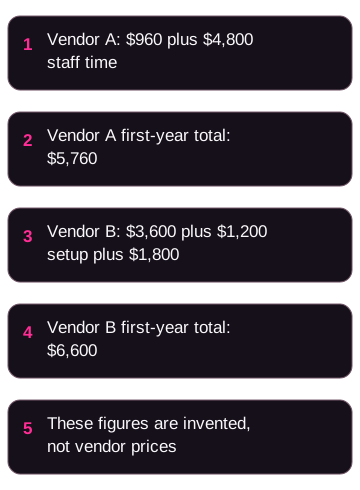
Line up two written proposals for the same jobs. Sum the first-year lines from each proposal. Sum the staff time your team will spend keeping the system running, using your own internal rate.
Compare those first-year totals side by side for newsletters, nurture, approvals, and CRM sync.
A larger first-year total is not automatically the wrong fit. If the proposal includes content or review tools your team would otherwise build by hand, the difference may be worth it. If those tools overlap with software you already pay for, it isn't.
Do not copy dollar amounts from this page. Public pricing pages change. Your written agreement is the one that matters.
Ask each vendor to confirm current plan, contact limits, send limits, add-ons, overages, setup, users, and contract term. Public pricing pages change. Your written agreement is the one that matters.
What email software does not decide for you
A platform can help you store approvals or keep copies of sends. That is a workflow aid. It is not your firm's legal conclusion.
Before you send, have your compliance reviewer look at:
- What consent you have for each list and each source of contacts.
- How opt-outs are processed in email, your CRM, website forms, and anywhere else you message people.
- Which messages, versions, approvals, testimonials, endorsements, or third-party ratings you need to keep.
- Whether you can retrieve the full record of a communication: who approved it, who received it, and when it went out.
- Who owns review when your team edits vendor-created content.
I am not giving legal, compliance, or investment advice. If your firm is an investment adviser or a broker-dealer, your reviewer should apply the advertising and communication rules that apply to you. Don't assume a "compliance" feature on a sales page means a message is allowed.
Your reviewer can start with the SEC investment adviser marketing guide and FINRA Rule 2210 where those sources apply to your firm. A link is not a summary of the rule, and it is not approval to send.
Do not buy or rent lists. Ask each vendor what contact sources they allow. If you are evaluating Mailchimp, read Mailchimp's Acceptable Use Policy as well. A vendor policy is not a substitute for your firm's review.
How to evaluate a platform before you switch
Run a small, documented test before you move the full list.
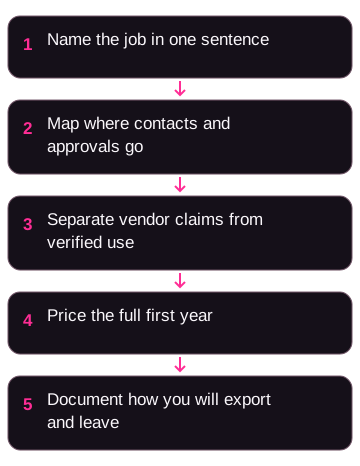
1. Name the job in one sentence. "We need a weekly client newsletter" is usable. "We need better marketing" is not. The demo should be able to answer the sentence you wrote.
2. Map the handoffs. Where does a contact enter? What data do you need? Who reviews the message? What happens after someone clicks or replies? Where is the record stored? An unclear handoff is a question to answer, not proof that a platform is bad.
3. Separate three kinds of yes. The vendor says the product can do it. Your team has seen it work with your workflow. Your compliance reviewer has approved the intended use. Only the first one comes from a sales page.
4. Price the full implementation. Include subscription, setup, migration, content production, integrations, extra users, training, archive access, review time, and any annual-term conditions. Don't compare one vendor's monthly starter price with another vendor's all-in cost.
5. Define the exit. Before you switch, document how you will export contacts, permissions, consent records, message history, templates, and reporting data. Confirm who can run the export and how you will review the files.
Email also sits beside the rest of how people find you. Use SEO for financial advisors when you are deciding how search visibility fits next to email, and lead generation for financial advisors when you are connecting capture, qualification, and nurture.
If nobody has time to write, review, and follow up, a new platform will not create those hours.
Five email sequences worth setting up
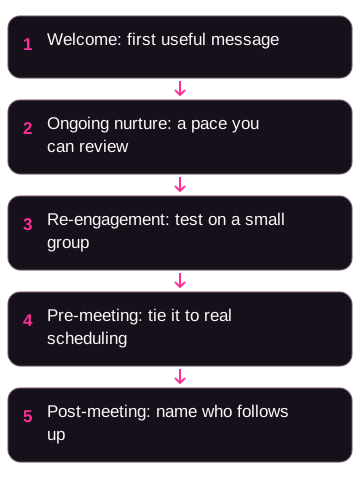
Once the tool is chosen, you still need messages people will actually receive. A useful starting set is welcome, ongoing nurture, re-engagement, pre-meeting, and post-meeting. Use them as a checklist. Your firm may need fewer, or different triggers.
Welcome. Define the first useful message, who gets it, what you are allowed to promise, and the next action. Confirm how the platform records that someone entered, and how they leave if they already booked a call.
Ongoing nurture. Pick a publishing pace your reviewer can keep up with. Name who owns the source material, who reviews it, and who sends it.
Re-engagement. Define what inactive means, how long you wait, what you send, and when you stop. Test that on a small group before you apply it to the whole list.
Pre-meeting. Document the approved preparation message, timing, audience, and the handoff to the person running the meeting. Tie it to how you actually schedule, not to a generic template.
Post-meeting. Specify what happens after the meeting, who owns the next contact, and which records you keep. A sent email is not the same thing as completed follow-up.
A few common questions
What is the best email marketing software for financial advisors?
There isn't a universal pick. Choose the platform whose workflow you have verified for your audiences, automations, integrations, content process, review needs, and total cost.
Can a general-purpose platform work for an advisory firm?
It can, when your firm can operate content, CRM updates, approvals, archives, and reporting around it. Verify that whole workflow before you treat the subscription price as the decision.
Does advisor-specific software make email marketing compliant?
No. Use the vendor's review and archive tools as inputs. Then have your firm's authorized reviewer check consent, opt-outs, records, content, and approvals. A platform cannot make that determination for you.
Should email software replace SEO or lead generation?
No. Email, search visibility, lead capture, and follow-up solve different jobs. Evaluate them together so you know what each one is for.
What should you verify before switching platforms?
The job you need done, data handoffs, permissions, approval workflow, archive retrieval, integrations, migration path, total cost, and the exit plan. Then run the intended workflow through your authorized compliance or legal review.
If you want help around the email decision
Platform choice is only one part of how people find your firm, learn why they might work with you, and book a conversation.
That's the kind of marketing we build at OJay Media: website pages, ads, qualification questions, and follow-up under your name. We have a commercial interest in that work. It is not the same product as an email-platform subscription, and it does not replace the vendor evaluation above.
If you want to see how we'd connect email to the rest of that process, schedule a Growth Advisory Call. You can also apply to work with OJay.
Related reading:
- Email marketing for financial advisors
- SEO for financial advisors
- Lead generation for financial advisors